
















Transform Your Pixel Phone into a Webcam for the Nintendo Switch 2

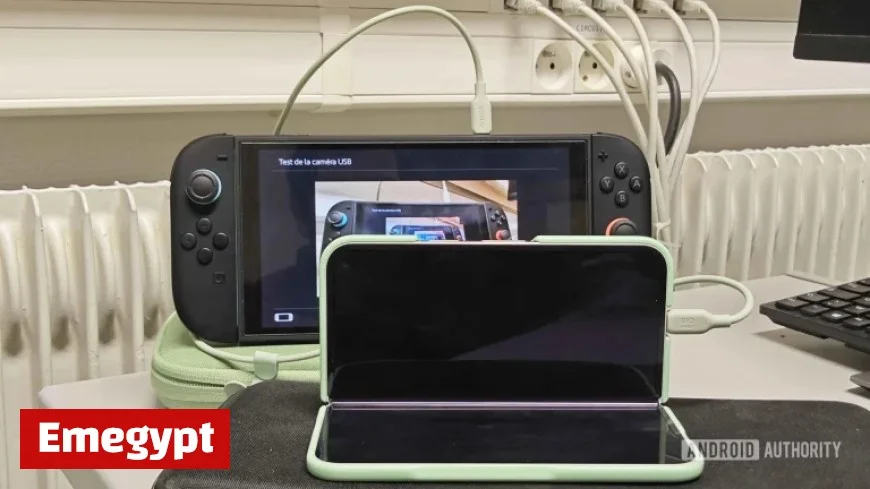
Google Pixel phones have recently gained the ability to serve as USB webcams for the Nintendo Switch 2, enhancing the console’s GameChat feature. This development allows gamers to engage in video calls directly through their devices without needing an additional webcam.
Introducing GameChat on Nintendo Switch 2
The Nintendo Switch 2 has introduced several social gaming features, one of which is GameChat. This functionality allows users to join group video calls while viewing each other’s gameplay. However, since the Switch 2 lacks a built-in camera, external hardware is necessary for video input.
Seamless Compatibility with Pixel Phones
Initial tests revealed some compatibility challenges between the Nintendo Switch 2 and Pixel phones. Early connections were often unstable, leading to confusion about whether the issue was with Nintendo or Google’s configuration. Fortunately, these problems have been resolved, and Pixel users can now utilize their phones as webcams.
How to Use Your Pixel Phone as a Webcam
To use your Google Pixel as a webcam for the Nintendo Switch 2, follow these steps:
- Connect your Pixel phone to the Switch 2 using a USB cable.
- Enable Webcam mode in the USB Preferences on your Pixel.
- Start a GameChat session to participate in video calls.
This integration is possible due to the USB Video Class (UVC) support introduced in Android 14. Google has uniquely configured its Pixel devices for this purpose, meaning users do not need third-party webcam applications.
Community Feedback
Users have reported successful connections, confirming that recent updates have made this feature possible. For instance, social media users have shared experiences and even photos to showcase how their Pixel phones function as webcams for the Switch 2.
Conclusion
If you own a Google Pixel phone and a Nintendo Switch 2, you’re in luck. You can now easily use your phone for video calls in GameChat, making gaming sessions more interactive and connected. With just your phone, you can join your friends in gameplay, regardless of what titles they’re currently playing.